# What is Birthdayy?
Get an overview about Birthdayy.
**Welcome! Thank you for using Birthdayy.💖**
### What is Birthdayy?
**Birthdayy** is a user-friendly bot designed to accommodate any kind of discord server across the world with remembering its user's birthdays in just a couple simple steps. Once the bot is added in a server, announcing and celebrating someone's birthday will be as easy as a piece of Birthdayy cake!
{% hint style="info" %}
**Did you know:** Birthdayy is the work of an individual Developer that never created a public bot before.
{% endhint %}
### Why is Birthdayy perfect for your server?
* **Easy To Set Up**
Thanks to the command guides you can find on the site and the simple commands it takes to get the bot up and running, Birthdayy is considered to be one of the easiest birthday bots to use based on the feedback it has received.
* **Innovative Features**
Birthdayy was created with the Intention to provide features that are outstanding and missing on other Birthday Bots on the market. \
You can be sure, that you will have amazing features when using Birthdayy.
* **Aesthetically Pleasing**
Birthdayy includes a variety of custom emojis to give a more appealing and fun look to each and every single built in command. We value appearance and aesthetic a lot.
* **Helpful Community**
The developer of the bot is doing his best to provide the most pleasant user experience when managing the bot, having a dedicated Birthdayy HQ server committed to answering questions, updating on the bot's progress, found bugs, bug fixes, surveys and any kind of news regarding the bot. Accompanied by a few simple users, the small but cooperative community can help you out with any type of questions you may acquire during your time of using it.
### Getting Started
{% hint style="success" %}
You can set up **Birthdayy** with just **two** commands.
{% endhint %}
Check out the **quick start** page to learn how to get started with **Birthdayy**
{% content-ref url="/pages/xV0U0XqYqTKfV4ALQTFH" %}
[Quick Start](/quickstart)
{% endcontent-ref %}
### Guides: Jump right in
Follow our handy guides to *start* using the full potential of **Birthdayy** as soon possible:
{% content-ref url="/pages/vbyudwYB3IlZKH7dHhT7" %}
[Set up Announcement Channel](/guides/config-commands-guides/set-up-announcement-channel)
{% endcontent-ref %}
{% content-ref url="/pages/farTWsW7x5oMSttgZm26" %}
[Register your Birthday](/guides/birthday-commands/register-your-birthday)
{% endcontent-ref %}
{% content-ref url="/pages/PI4rWXFylivtVe8tAd3k" %}
[Set up a Birthday Role](/guides/config-commands-guides/set-up-a-birthday-role)
{% endcontent-ref %}
{% hint style="danger" %}
**Need Help:** Join the Birthdayy HQ Discord Server to get additional Support!
{% endhint %}
{% content-ref url="/pages/0GNRPvuvewv4lseUseMz" %}
[Support & Community Discord](/extras/links/discord)
{% endcontent-ref %}
# Quick Start
Need help with getting started with Birthdayy? Read this quick Introduction!
### Step 1. Add a Birthday
Once Birthdayy has been added to your server, add a birthday using ***/birthday register*** with the required parameters ***Day*** and ***Month***. Optional you can add a ***Year***. That allows you to submit the very first birthday date in your server and also let you check if the bot’s custom emojis are working.
{% hint style="info" %}
If you want to add the Birthday of another User, add the optional ***User*** Parameter to the Command. (*Manage Roles* permission required)
{% endhint %}
### Step 2. Set Up An Announcement Channel
For the bot to be able to show the birthday announcement on the day of the birthday, it’s needed to have an assigned announcement channel. By typing ***/config announcement*** and then choosing the channel to your liking, Birthdayy will be able to successfully remind the server of the member’s birthday.
### Step 3. Choose A Timezone
As the default timezone of the bot is ***UTC***, servers in different parts of the world are required to pick the timezone of their region for the best announcement timing. Using the ***/config timezone*** command, you can select your desirable timezone with a simple click.
### Step 4. Test you Birthdayy Configurations
You can test the current Configurations that you have previously set up in [Step 3](#step-3.-choosing-a-timezone) with the command ***/birthday test.***
# /birthday commands
Useful guides for using the /birthday command.
{% hint style="info" %}
With the ***/birthday*** commands you can customize Birthdayy to your needs.
By typing ***/help*** you can check out all the commands that are available, letting you use Birthdayy to its full potential.
{% endhint %}
### Birthday Command Overview
{% content-ref url="/pages/7VedxUYG0iw7H8NwfgeP" %}
[Birthday](/commands/birthday)
{% endcontent-ref %}
### Available /birthday guides
{% content-ref url="/pages/farTWsW7x5oMSttgZm26" %}
[Register your Birthday](/guides/birthday-commands/register-your-birthday)
{% endcontent-ref %}
{% content-ref url="/pages/C2gVodnbuIWzMnsLno0F" %}
[Remove Birthdays](/guides/birthday-commands/remove-birthdays)
{% endcontent-ref %}
{% content-ref url="/pages/cy6ZKQNq1d7p8WErg8mx" %}
[Showing Someone's Birthday](/guides/birthday-commands/showing-someones-birthday)
{% endcontent-ref %}
{% content-ref url="/pages/C7F1MM1CLrXAWySMYIAy" %}
[Update Birthdays](/guides/birthday-commands/update-birthdays)
{% endcontent-ref %}
{% content-ref url="/pages/dfxwXc3IU3X8OWtJcO5D" %}
[Test your Birthdayy Configuration](/guides/birthday-commands/test-your-birthdayy-configuration)
{% endcontent-ref %}
# Register your Birthday
In this quick guide, you will learn how to register your Birthday or other Birthdays
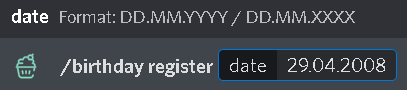
Adding your birthday is one of the simplest tasks that can be done with the bot. Using the command ***/birthday register*** and then adding the date of your birthday using the ***dd.mm.yyyy*** format, birthday will automatically add your birthday to the server's birthday list!
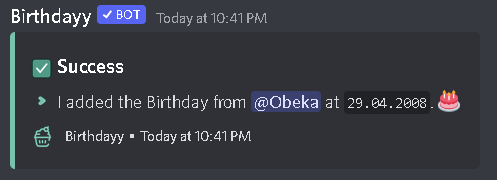
For example, if your birthday is on April 29th 2008, your command should look like ***/birthday register 29.04.2008***
Once you enter the command, your birthday will be announced in the specific server on the day of your birthday for all the members to see and wish you a happy birthday!
{% hint style="info" %}
The Birthdayy bot is a ***per-server*** bot. This means that if a few of the servers you're in include BIrthdayy, your birthday date will appear on only the ones you register on, ***NOT*** the other ones.
{% endhint %}
### Hiding your Age
If you wish to keep your age a secret, Birthdayy has your back! Taking the same date as in the previous example, by typing ***/birthday register 29.04.XXXX*** Birthdayy will accept the date and your age will be safe and sound!
{% hint style="success" %}
Enjoy what Birthdayy offers you? Make sure to support us by clicking on and voting with just a simple click!
{% endhint %}
# Update Birthdays
In this quick guide, you will learn how to update your or someone else's birthday.
Mistyping something while registering your birthday can happen quite often, so instead of removing your birthday and then adding it again, the ***/birthday update*** can help you with changing it faster.
This way, by simply using the ***/birthday update*** and then adding the user's name and correct date, Birthdayy will change it and the Birthdayy list will automatically update.
{% hint style="warning" %}
To make sure no one uses the command to their advantage to change their birthday every day, normal members are not able to use this command. So unfortunately, if you would like to change your birthday to the correct date, you need to ask the server own or someone with the ***Manage Roles*** permission.
{% endhint %}
# Remove Birthdays
In this quick guide, you will learn how to remove the birthday of you or someone else.
In case a member decides they're not comfortable with sharing their birthday anymore, their birthday date can easily be removed using ***/birthday remove*** .
If your server role also has the ***Manage Roles*** permission, all it take is to write the command and then the username of the person that would like to remove their birthday, Birthdayy will immediately remove it from the list and will not announce it anymore..
# Test your Birthdayy Configuration
In this quick guide, you will learn how you can test the current Configuration of Birthdayy.
How should you know if the bot is set up correctly and if all the roles and channels are working properly after you prepare Birthdayy?
All it takes to test out all the customising you've done is as simple as using \_ **/birthday test**\_ in your server. That will give you the birthday role for 24 hours, will announce your birthday in the announcement channel, but it ***won't*** change the birthday date that you've already registered so you don't have to worry about registering your correct birthday again.
{% hint style="success" %}
Enjoy what Birthdayy offers you? Make sure to support us by clicking on and voting with just a simple click on as many sites as possible!
{% endhint %}
# Showing Someone's Birthday
In this quick guide, you will learn how you can see your or someone's birthday.
In case the birthday list is way too long for you to find a member's birthday, you can easily see it by typing ***/birthday show*** and then typing the username of the member. That way, a short message will pop up, showing you the exact date.

# /config commands guides
Useful guides for using the /config command.
{% hint style="info" %}
With the ***/config*** commands you can customize Birthdayy to your needs.
By typing ***/help*** you can check out all the commands that are available, letting you use Birthdayy to its full potential.
{% endhint %}
### Config Command Overview
{% content-ref url="/pages/nn2jJFVhgVozIifTaMU0" %}
[Config](/commands/config)
{% endcontent-ref %}
### Available /config guides
{% content-ref url="/pages/vbyudwYB3IlZKH7dHhT7" %}
[Set up Announcement Channel](/guides/config-commands-guides/set-up-announcement-channel)
{% endcontent-ref %}
{% content-ref url="/pages/oGjg8rPCF6OyLCPI0u8p" %}
[Set up an Overview Channel](/guides/config-commands-guides/set-up-an-overview-channel)
{% endcontent-ref %}
{% content-ref url="/pages/PI4rWXFylivtVe8tAd3k" %}
[Set up a Birthday Role](/guides/config-commands-guides/set-up-a-birthday-role)
{% endcontent-ref %}
{% content-ref url="/pages/PiNpZFgsXI0SeXyVe20D" %}
[Change up the Server Timezone](/guides/config-commands-guides/change-up-the-server-timezone)
{% endcontent-ref %}
{% content-ref url="/pages/F7Z7Gqp4F5RYG32zd6bN" %}
[Set Up a Ping Role](/guides/config-commands-guides/set-up-a-ping-role)
{% endcontent-ref %}
# Set up Announcement Channel
In this quick guide, you will learn how to set up an announcement channel.
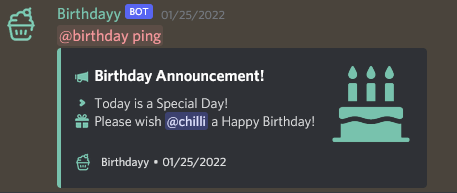
Announcing someone's birthday is going to be hard to do if the Birthdayy bot doesn't have an assigned Announcement channel to use. To successfully add a designated location for the celebration message to show, the owner of the server can use the ***/config announcement*** command and then choose the channel they wish to use.
Once the command is used, on the day of someone's birthday, a reminder/celebration message should appear on the specific channel.
Birthday Announcement
# Set up an Overview Channel
In this quick guide, you will learn what an overview channel is and how to set it up.
Just like the name gives it away, the Overview channel shows you a general review of all the birthdays registered in the server. By typing ***/config overview*** and then clicking on the channel you wish the following list to show, every time a birthday is registered or updated, the list will automatically refresh it. This way, every member has the ability to pay attention to upcoming birthdays!

# Set up a Birthday Role
In this quick guide, you will learn how to set up a custom birthday role.
Everyone should feel special on their birthday, and that's why Birthday gives you the option to assign a ***Birthday Role*** for a day to the birthday child!
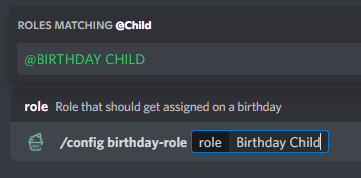
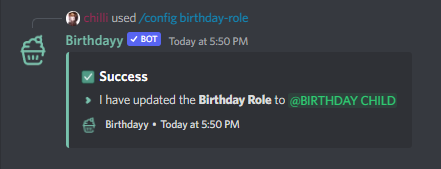
If you wish to gift a special role on someone's birthday, first create a new role and make sure that the Bot's role is above the new one. Next, use ***/config birthday-role*** and select the role that should get assigned. Once you receive the confirmation message, you should be good to go.
#### 1. Create Birthday child role and put the Bot role is above it
Birthdayy Bot role is above the birthday child role
#### 2. Use /config birthday-role and select the desired role
Select the Birthay Child Role
#### 3. Set config successfully
Success message
# Change up the Server Timezone
In this quick guide, you will learn how to change the timezone of your server.
The default timezone for the bot has been assigned the ***UTC timezone***. Many of the Birthdayy bot users live in different places, which means that for the bot to announce a birthday at midnight of a specific timezone, the server owner is required to use ***/config timezone*** and add the timezone the server is in for the perfect birthday announcement!
{% hint style="warning" %}
The bot can only have one timezone, not different ones for every single member in the server. If your server consists of people around the world, it is advised to come to an agreement with everyone for the best possible timezone for the server to have.
{% endhint %}
# Set Up a Ping Role
In this quick guide, you will learn how to set up a custom ping role to get notified on a birthday.
{% hint style="danger" %}
It is not possible to choose @everyone or @here. Please use a custom role.
{% endhint %}
If you wish to add a role, that will be sent alongside the birthday announcement, to notify your Server member about a birthday. Type ***/config ping-role*** and choose the desired role that should get pinged.
# Overview
Get a quick overview over all commands Birthdayy has.
**This page lists all usage and information about Birthdayy's commands.**\
**For more information**, **visit the corresponding help page**
{% hint style="info" %}
How to Read these Docs
* Arguments in **`< >`** are *mandatory*.
* Arguments in **`[ ]`** are *optional*.
{% endhint %}
> Prefix: /
## General
All general commands of Birthdayy.
`/guide`\
A simple guide to guide you on how to set up the bot.
`/help [commands]`\
Need help with commands? (subcommands are not supported, at the moment)
`/status`\
Show the status of the bot commands.
`/vote`\
Vote for Birthdayy!
`/invite`\
Invite the bot!
`/support`\
Join the support server!
`/feedback`\
Want to review Birthdayy? Feel free to leave some feedback!
`/suggestion `\
Have a suggestion for the bot, let us know!
`/bugreport `\
File a bug report to the server developer.
{% content-ref url="/pages/b7i56pIUWIAb0DKUnLiJ" %}
[General](/commands/general)
{% endcontent-ref %}
## Birthday
All subcommands of the `/birthday` command.
[`/birthday register [year] [user]`](/guides/birthday-commands/register-your-birthday)\
Register users' birthday with the bot.
[`/birthday update [year]`](/guides/birthday-commands/update-birthdays) \
Update users' birthday with the bot.
[`/birthday remove `](/guides/birthday-commands/remove-birthdays)\
Remove users' birthday from the bot.
`/birthday list`\
List all the users' birthday in embed format.
[`/birthday show [user]`](/guides/birthday-commands/showing-someones-birthday)\
Show the user's birthday.
{% content-ref url="/pages/7VedxUYG0iw7H8NwfgeP" %}
[Birthday](/commands/birthday)
{% endcontent-ref %}
## Birthdayy Configuration (**for server manager only**)
All subcommands of the `/config` command.
`/config status`\
To show the overall configuration of the bot.
`/config logs `\
To set the logs channel for the bot.
[`/config overview `](/guides/config-commands-guides/set-up-an-overview-channel)\
To set the overview of the Birthdayy bot.
[`/config announcement `](/guides/config-commands-guides/set-up-announcement-channel)\
To set an announcement channel for the bot
[`/config ping-role `](/guides/config-commands-guides/set-up-a-ping-role)\
Configure the ping/ mentioned role.
[`/config birthday-role `](/guides/config-commands-guides/set-up-a-birthday-role)\
Configure the birthday role.
[`/config timezone `](/guides/config-commands-guides/change-up-the-server-timezone)\
Configure the timezone region for the bot.
`/config announcement-message `\
Change the default Birthday announcement message. (Birthdayy Premium requred).\
Available Variables: ***{MENTION}***, ***{USERNAME}***, ***{DISCRIMINATOR}***, ***{LINE\_BREAK}***, ***{SERVERNAME}***
# General
General commands, that Birthdayy has.
### `bugreport`
*Usage:* `/bugreport `\
File a bug report to the server developer.
### `feedback`
*Usage:* `/feedback`\
Want to review Birthdayy? Feel free to leave some feedback!
### `guide`
*Usage:* `/guide`\
A simple guide to guide you on how to set-up the bot
### `help`
*Usage:* `/help [commands]`\
Need help with commands? (subcommands are not supported, at the moment)
### `invite`
*Usage:* `/invite`\
Invite the bot!
### `status`
*Usage:* `/status`\
Show the status of the bot
### `suggestion`
*Usage:* `/suggestion `\
Have a suggestion for the bot, let us know!
### `support`
*Usage:* `/support`\
To join the support server!
### `vote`
*Usage:* `/vote`\
Vote for Birthdayy!
# Birthday
Infos about the /birthday subcommands.
### `register`
*Usage:* `/birthday register [year] [user]`\
Register a user's birthday.
### `update`
*Usage:* `/birthday update [year]`\
Update a user's birthday.
### `remove`
*Usage:* `/birthday remove `\
Remove users' birthday from the bot.
### `list`
*Usage:* `/birthday list`\
List all the users' birthday in embed format.
### `show`
*Usage:* `/birthday show [user]`\
Show the user's birthday.
# Config
Infos about the /config subcommands.
### `status`
*Usage:* `/config status`\
To show the overall configuration of the bot.
### `logs`
*Usage:* `/config logs `\
To set the logs channel for the bot.
### `overview`
*Usage:* `/config overview `\
To set the overview of the birthdayy bot.
### `announcement`
*Usage:* `/config announcement `\
To set an announcement channel for the bot
### `ping-role`
*Usage:* `/config ping-role `\
Configure the ping/ mentioned role.
### `birthday-role`
*Usage:* `/config birthday-role `\
Configure the birthday role.
### `timezone`
*Usage:* `/config timezone `\
Configure the timezone region for the bot.
### `announcement-message`
*Usage:* `/config announcement-message `\
Change the default Announcement Message to a custom one
{% hint style="success" %}
Available to Birthdayy Premium User!
{% endhint %}
# General
## There are numbers instead of the User when doing /birthday list?
Does your Birthday list look like this?
There are numbers instead of the User
This Issue is related to how Discord Caches Data to ensure a smooth user experience and not much loadingtime. When the UserID instead of the UserTag is displayed it usualy means that the specific user is not yet loaded into yur cache.
Unfortunately there is nothing much I can do to solve this, since it is an Issue/Feature on Discords site. I am working on having a option to use nicknames instead of mentions, but this will take some time to get implemented.
#### What can I do to solve it?
You can force the cache to update with the data of the User. To do this write the following in the chat: \`<@THE\_NUMBER\_HERE>\` and send it.
Note, that this is just a temporary solution and will only work until the discord app or your device restarts.
The Issue is way more common on Mobile Phones, espeacially Android. PC users should have a better experience, but it can still come to this issue on big server.
## The Announcement Message Embed is not displayed on someone's birthday?
Birthdayy only sends out a PingRole Mention
If you are facing this issue, check in the Role Settings, if the PingRole has enabled the "Allow anyone to @mention this role" Permission.
This is a workaround currently and will be fixed in upcoming versions.
# Errors
Anything not working? Check out this Error FAQ Page to get the most common questions answered.
## My Emojis are showing up as :emoji-name:
This is a common Error, that emojis are not showing up as emojis in Discord. There are some steps you can do to fix this issue.
Possible causes:
* Everyone Role missing “Use External Emoji” Permissions
* Bot Role disabled “Use External Emoji” Permissions
* Channel disabled "Use External Emoji" Permissions
* The highest Role of the Bot has disabled “Use External Emoji” Permissions
The most often Cause of this issue is Discord related.\
Go to the Server Settings 🠮 Roles 🠮 Default Permissions and check that the “Use External Emoji” permission is activated.


## Something went wrong while registering the Birthday.
**Get this Error while registering?** As the Error suggests, you might have used a wrong date.
The correct format is: ***DD.MM.YYYY*** so for example *29.01.2003* for the *29.* January *2003.*
{% hint style="info" %}
Still not working? Visit the Birthdayy HQ to get additional Support!
{% endhint %}
{% embed url="" %}
# Birthday
Frequently asked Questions about Birthday
## How can I add a Birthday for another Person?
Doing so is super easy! Just add a User parameter after setting the Date of a birthday.
{% hint style="danger" %}
**MANGE ROLES** permission is required for setting Birthdays for other People
{% endhint %}
Add a user to the Birthday
## How can I remove a Birthday from a user that has left the Discord Server?
If you are sure the member you want to remove the birthday from has left the discord server, you can copy the User ID from theperson by right-clicking on them, then selecting `copy id.` (You need to have Developer Mode activated in Discord).
Now type `/birthday remove` and paste the ID in the selection field instead of selecting a user. This should be it!
# Premium
Frequently asked Questions about Birthday Premium
## I just subscribed on Patreon what now?
Join the [Support & Community Discord](/extras/links/discord) and create a new Ticket.\
Make sure to link your Discord Account to your Patreon account :)
# Links
A Collection of useful links
# Homepage
Checkout the Homepage of Birthdayy
{% embed url="" %}
# Invite Birthdayy
Invite Birthdayy on your Discord Server.
{% embed url="" %}
Invite [Birthdayy](https://birthdayy.xyz/invite)
{% endembed %}
# Vote
Check out where you can vote for Birthdayy.
{% embed url="" %}
Vote for Birthdayy on Bot.GG
{% endembed %}
{% embed url="" %}
Vote for Birthdayy on Top.GG
{% endembed %}
{% embed url="" %}
Vote for Birthdayy on discord-botlist.eu
{% endembed %}
# Support & Community Discord
{% embed url="" %}
# Ideas & Bugs
{% embed url="" %}